Introduction
HR teams face a relentless coordination challenge: new hire paperwork, system provisioning, compliance tracking, and training enrollment all happening simultaneously—often manually. The cost of slow, error-prone onboarding is steep. Up to 33% of new hires leave within their first 90 days, and replacing them costs between 50% to 200% of their annual salary. Manual onboarding consumes up to 10 hours of HR administrative time per hire, creating bottlenecks that delay productivity and frustrate new employees.
Employee onboarding automation uses technology to streamline repetitive HR workflows—from document collection to training enrollment—reducing errors, accelerating time-to-productivity, and freeing HR teams to focus on employee relationships and strategic HR work.
This guide covers what onboarding automation is, key workflows to automate, measurable benefits, implementation steps, and risks to avoid—including where AI fits into the picture.
Key Takeaways
- Automates paperwork, system provisioning, and compliance tasks from pre-boarding through 90-day check-ins
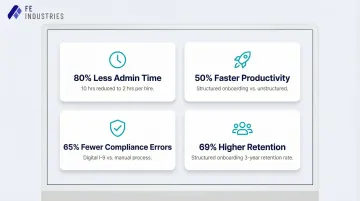
- Cuts HR administrative time by 80% (from 10 hours to 2 hours per hire)
- Reduces I-9 compliance errors by 65% and eliminates costly DHS fines
- Accelerates time-to-productivity by up to 50% through structured workflows
- Works best with SOC 2-compliant platforms, role-based access controls, and human oversight for terminations and compensation decisions
What Is Employee Onboarding Automation?
Employee onboarding automation uses software and AI-driven workflows to execute repetitive, manual tasks involved in integrating new hires into an organization—covering everything from pre-boarding to the 90-day mark. Rather than HR coordinators manually sending forms, tracking signatures, and coordinating IT access, automation handles these tasks through predefined triggers and system integrations.
The core components work together as an orchestration layer:
- Workflow triggers – Predefined business events (offer acceptance, Day 1 arrival, 30-day milestone) that automatically initiate tasks
- System integrations – Connections across HRIS, IT provisioning tools, compliance platforms, and learning management systems (LMS)
- Automated communications – Emails, reminders, and notifications sent automatically based on workflow status
This orchestration eliminates coordination bottlenecks without removing the interactions that actually require human judgment—mentorship, culture conversations, and structured check-ins.
Automation vs. Traditional Onboarding: A Quick Contrast
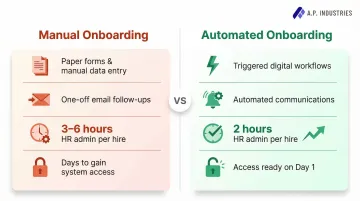
Traditional onboarding relies on manual data entry, one-off emails, paper forms, and constant HR follow-up. This approach is prone to delays and inconsistency, especially when onboarding multiple hires at once.
The time costs add up fast:
| Role | Manual Onboarding Time Per Hire |
|---|---|
| HR Coordinator | 2–4 hours (paperwork, data entry, file management) |
| Hiring Manager | 1–2 hours (orientation coordination) |
| Combined | 3–6 hours of administrative overhead |
Automation replaces these manual touchpoints with standardized, triggered workflows. When a candidate accepts an offer, the system automatically sends welcome emails, distributes digital paperwork, creates email accounts, and assigns training modules—without any manual handoff. New hires move through onboarding in minutes rather than days, and HR teams reclaim up to 8 hours per hire for higher-value work.
Key Onboarding Workflows You Can Automate
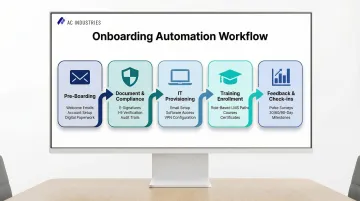
Pre-Boarding Workflows
Pre-boarding represents a critical vulnerability: approximately 1 in 5 new hires (19-20%) accept a job offer but fail to appear on Day 1 due to lack of engagement during the notice period. Automated pre-boarding workflows keep new hires engaged, informed, and committed from offer acceptance through their first day.
Key automations include:
- Welcome emails sent immediately upon offer acceptance
- Email and communication account setup (Slack, Google Workspace, Microsoft Teams)
- Onboarding buddy or mentor assignments
- Digital paperwork distribution before Day 1
- Pre-boarding content delivery (culture videos, team introductions, first-week schedules)
Employees who engage in pre-boarding are more than 80% more likely to show up on Day 1 and 60% more likely to stay beyond year one.
Document Management and Compliance
I-9 paperwork errors alone carry DHS fines ranging from $288 to $2,861 per form — and that's before accounting for the administrative cost of chasing missing signatures. Automation handles distribution, signing, and storage of contracts, NDAs, tax forms, and policy acknowledgments through integrated e-signature platforms, removing both the compliance risk and the manual follow-up.
Benefits:
- Automated reminders ensure nothing slips through the cracks
- Compliance audit trails are maintained automatically
- Forced-completion logic prevents missing signatures or incorrect dates
- Digital I-9 and E-Verify integrations reduce compliance errors by up to 65%
Once document workflows are locked down, the next friction point hits on Day 1 itself: system access.
IT Provisioning and Access Management
Day 1 delays where new employees can't access the systems they need kill momentum and signal disorganization. Automated IT provisioning triggers role-based access setup for software tools, hardware requests, and system permissions automatically upon hire confirmation.
What gets automated:
- Email account creation
- Software license assignment (CRM, project management, communication tools)
- Hardware provisioning requests
- VPN and security access
- Role-based permissions configuration
Without automation, each of these typically requires a separate manual ticket — meaning a new hire might wait two or three days before they're fully operational.
With system access handled before Day 1, training can begin on schedule rather than waiting for infrastructure to catch up.
Training Enrollment and Learning Paths
Automated training enrollment ensures new hires receive role-specific modules, compliance courses, and onboarding learning paths based on department and job function, with no manual coordination required.
Advanced capabilities include:
- Auto-enrollment based on role, department, or location
- Automatic scoring and certificate generation
- Manager notifications when training is completed
- Adaptive systems that adjust training paths based on individual progress and performance
- Audit-ready documentation for compliance training
The result is consistent delivery across every cohort, with HR out of the scheduling loop entirely.
Feedback Collection and Progress Check-Ins
Automated pulse surveys at key milestones (post-pre-boarding, end of week 1, 30/60/90 days) provide consistent data collection without requiring manual scheduling. Results route automatically to HR dashboards, enabling early identification of flight risk and engagement issues.
Key automation points:
- Automated survey distribution at predefined milestones
- Sentiment analysis to surface engagement themes
- Escalation alerts for concerning responses
- Trend tracking across cohorts
- Manager notifications for follow-up
Benefits of Automating Employee Onboarding
Faster Time-to-Productivity
New employees typically require 8 to 12 months to reach their full performance potential. However, organizations with structured onboarding see new hires reach productivity up to 50% faster. Automation removes the delays caused by waiting on HR to manually send forms or set up access, compressing the ramp-up timeline.
The impact is measurable: automated onboarding programs reduce time-to-productivity by 30% to 40% by eliminating administrative delays, providing training in optimal sequence, and ensuring new hires receive the right information at the right time.
Reduced Errors and Compliance Risk
Automated workflows eliminate manual data entry mistakes—missed signatures, wrong form versions, overlooked compliance steps. This is especially critical in regulated industries where audit readiness is mandatory.
Compliance impact:
- Digital I-9 systems reduce errors by 65% compared to manual processes
- 45% of HR teams using manual systems report fixing I-9 errors at least monthly
- Automated validation prevents paperwork violations that carry fines up to $2,861 per form
- Built-in audit trails provide immediate documentation for regulatory inspections
Scalability Without Added Headcount
Manual onboarding creates a hard ceiling on how many hires HR can onboard simultaneously. The median HR-to-employee ratio is 1.98, meaning nearly two HR professionals are required for every 100 employees. Manual processes consume approximately 73% of HR's time with repetitive administrative tasks.
Automation breaks this constraint directly: HR's active involvement per new hire drops from 10 hours to 2 hours—an 80% reduction. Companies can scale hiring volumes without proportionally scaling HR headcount, protecting margins during growth phases.
Improved New Hire Experience and Retention
A smooth, responsive onboarding process signals organizational competence and respect for employees' time. Employees who experience structured onboarding are 69% more likely to remain with the firm for at least three years.
Organizations with standard onboarding processes experience 50% greater new hire retention. For a 200-person company with 20% turnover, reducing early departures by even 50% can save $75,000 or more per year in direct replacement costs.
HR Team Focus on Strategic Work
Those savings only hold if HR has the capacity to maintain onboarding quality as the organization grows. Automation creates that capacity: AI-driven compliance and onboarding workflows reduce HR administrative workloads by 30% to 50%, shifting time toward culture-building, performance support, and the strategic people initiatives that directly affect retention and engagement.
How to Implement Employee Onboarding Automation: Step-by-Step
Step 1 — Audit and Map Your Current Onboarding Process
List every task involved in onboarding a new hire from offer acceptance to 90 days. Note which tasks are repetitive and rule-based (good automation candidates) versus which require judgment or relationship-building (keep human).
Create a task inventory:
- Pre-boarding communications
- Document collection and signing
- IT access provisioning
- Training assignments
- Manager check-ins
- Compliance certifications
- Feedback collection
Tag each task by frequency, time cost, error risk, and whether it requires human judgment.
Step 2 — Prioritize Automation by Impact
Rank tasks by time cost and error risk. High-volume, low-judgment tasks like form distribution, access provisioning, and training enrollment should be automated first. Avoid automating nuanced conversations about compensation, performance, or career development.
Prioritization matrix:
- High Priority: Document distribution, IT provisioning, training enrollment, compliance tracking
- Medium Priority: Pre-boarding communications, milestone reminders, feedback surveys
- Low Priority/Keep Human: Compensation discussions, performance conversations, culture onboarding, mentorship
Step 3 — Select the Right Technology and Partner
Look for platforms that integrate across your HRIS, IT, and LMS systems rather than point solutions that only solve one piece of the puzzle. Evaluate for security certifications (SOC 2), audit logging, and scalability.
Key evaluation criteria:
- HRIS integration (Workday, BambooHR, ADP, etc.)
- IT provisioning integration (Okta, Active Directory, Google Workspace)
- LMS integration (Cornerstone, Docebo, SAP SuccessFactors)
- E-signature integration (DocuSign, Adobe Sign)
- SOC 2 Type II compliance
- Role-based access controls and MFA
- Audit logging and compliance reporting
- Auto-scaling infrastructure for high-volume periods
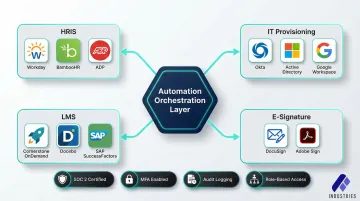
Most vendors address one layer of this stack. Assembly Industries takes a different approach: a single orchestration layer that connects AI agents, human oversight, and your existing systems to manage the full onboarding journey. For teams evaluating end-to-end platforms rather than another point solution, that unified accountability model is worth weighing against the tool-by-tool alternative.
Step 4 — Build and Test Workflows Before Full Rollout
Configure automation triggers, test with a small cohort of new hires, gather feedback, and refine before deploying at scale. Track errors, completion rates, and satisfaction scores during the pilot phase.
Pilot testing checklist:
- Select 5-10 new hires across different departments
- Monitor workflow completion rates
- Track time-to-completion for each step
- Document errors and exceptions
- Collect new hire satisfaction feedback
- Measure HR time savings
- Identify bottlenecks or failure points
Refine workflows based on pilot results before enterprise-wide deployment.
Step 5 — Train HR Staff and Measure Ongoing Performance
HR teams need to understand how to monitor automated workflows, intervene when flagged, and interpret analytics dashboards. Establish KPIs like time-to-completion, form error rates, training completion rates, and new hire satisfaction scores to measure ROI continuously.
Key performance indicators:
- Average time-to-full-onboarding
- Document completion rates
- Training completion rates
- I-9 error rates
- New hire satisfaction scores (30/60/90-day surveys)
- HR administrative hours per hire
- SLA compliance rates
Common Risks of Onboarding Automation (and How to Mitigate Them)
Data Security and Compliance Gaps
Automated systems collect and store sensitive employee data—banking information, emergency contacts, tax documents, Social Security numbers. The global average cost of a data breach is $4.44 million, surging to $10.22 million in the United States.
Mitigation strategies:
- Choose platforms with end-to-end encryption (TLS 1.2+ for data in transit, AES-256 for data at rest)
- Require SOC 2 Type II compliance for all HR SaaS vendors
- Implement role-based access controls with least-privilege principles
- Mandate multi-factor authentication for privileged access
- Ensure comprehensive audit logging with immutable trails
- Conduct annual independent penetration testing
When evaluating vendors, SOC 2 Type II certification and immutable audit logging aren't nice-to-haves — they're the baseline for any platform handling employee data at scale.
Over-Reliance and Workflow Failure
Automating without adequate human oversight creates fragility. A misconfigured workflow can delay IT access or skip a compliance step entirely, creating legal exposure and frustrating new hires.
To reduce workflow fragility:
- Assign HR owners to monitor automated processes daily
- Establish escalation protocols for exceptions and errors
- Build manual override capabilities for urgent situations
- Implement automated alerting for workflow failures
- Conduct regular workflow audits to identify misconfigurations
- Maintain documentation for all automation logic
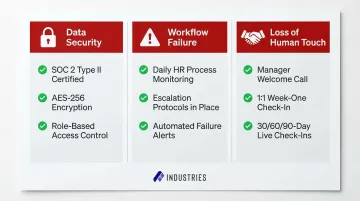
Human oversight is a necessary safety layer. It catches edge cases and system failures before they reach employees.
Loss of the Human Touch
Over-automating removes the personal connection that sets the tone for the employee relationship. New hires need to feel welcomed, valued, and connected to the organization's culture—not just processed through a system.
Preserve intentional human touchpoints:
- Personal welcome message from direct manager (video or phone call)
- 1:1 culture conversation in week one
- Live team introduction (not just email)
- Onboarding buddy or mentor assignment with scheduled check-ins
- Live check-ins at 30/60/90-day marks with manager
Automation should clear the administrative load so HR and managers have more time for these moments. The goal is more human connection, handled better.
Frequently Asked Questions
What are the 5 stages of the employee onboarding process?
The five stages are pre-boarding (offer acceptance to Day 1), orientation (Day 1 introduction and paperwork), role-specific training (job responsibilities), integration (building team connections), and ongoing support (check-ins through the first 90 days). Each stage targets a specific gap in the new hire experience — from paperwork compliance to long-term retention.
What is the 30-60-90 day onboarding process?
The 30-60-90 day framework structures onboarding into phases: learning the role and company in the first 30 days, contributing independently by day 60, and fully owning responsibilities with measurable impact by day 90. Each phase ties progress to specific deliverables, making it easier to spot and fix gaps early.
What are the 5 C's of employee onboarding?
The 5 C's are Clarity (role expectations), Compliance (policies and legal requirements), Culture (company values), Connection (colleague relationships), and Check-in (ongoing follow-up). Together, they address both the functional and human sides of getting a new hire up to speed.
What are the benefits of employee onboarding automation?
Automation delivers faster time-to-productivity, reduced errors, improved compliance, better new hire experience, and the ability to scale onboarding without adding HR headcount. It cuts HR administrative time by 80% while reducing compliance errors by up to 65%.
What are the benefits of onboarding new hires properly?
Structured onboarding improves employee retention, accelerates productivity, reduces early turnover costs, and builds stronger connection to company culture from day one. Employees who experience structured onboarding are 69% more likely to stay for at least three years, protecting recruitment ROI and reducing costly early departures.