Introduction
HR teams are drowning. Between manual data entry, paper-based onboarding, payroll errors, and chasing down signatures, HR professionals spend up to 57% of their time on administrative tasks rather than strategic work. That leaves little room for the people-focused initiatives that drive business results—hiring top talent, building culture, and supporting employee growth.
HR automation changes this equation. By using software, AI, and workflow tools to handle repetitive, rule-based tasks at scale, HR teams can reclaim their time and refocus on what matters. This guide covers the definition of HR automation, real-world examples, key benefits, implementation challenges, and a practical roadmap for getting started.
TLDR:
- HR automation uses AI and software to handle repetitive tasks—payroll, onboarding, compliance—with minimal manual input
- 97.8% of Fortune 500 companies now use applicant tracking systems, cutting time-to-hire by 40%
- Automated payroll reduces errors by up to 50% and saves 25% in processing time
- Effective implementation requires process audits, pilot testing, and ongoing optimization—not just deploying a tool
What Is HR Automation?
HR automation is the use of software, AI, and workflow tools to handle repetitive, rule-based HR tasks with minimal manual input. This spans functions like payroll processing, onboarding, applicant tracking, compliance documentation, benefits administration, and employee self-service.
Automation vs. Traditional HR Software
Traditional HR technology stores data—think of legacy HRIS systems as digital filing cabinets. Automation goes further by actively executing tasks and triggering workflows without human intervention at every step. For example, a traditional system might store employee records, while an automated system sends offer letters, provisions IT access, and schedules orientation automatically when a candidate accepts an offer.
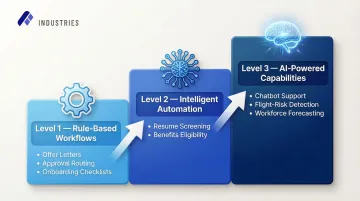
The automation spectrum spans a wide range of capability:
- Rule-based workflows — auto-generating offer letter templates, routing approvals, triggering onboarding checklists
- Intelligent automation — resume screening against job criteria, benefits eligibility calculations
- AI-powered capabilities — chatbot employee support, predictive flight-risk detection, workforce demand forecasting
Why HR Automation Is Urgent Now
57% of HR professionals report working beyond normal capacity, with most of their time consumed by transactional tasks rather than strategic work. Enterprises have responded: by the end of 2023, 72% of organizations had automated at least one HR function, with payroll processing leading adoption.
The investment dollars confirm the shift. The global HR technology market is projected to grow from $47.32 billion in 2026 to $95.95 billion by 2034 — a 9.2% compound annual growth rate — as organizations move from managing HR to automating it.
What HR Tasks Can Be Automated? Practical Examples
Not every HR task should be automated. Tasks requiring empathy, judgment, or complex relationship management—performance coaching, conflict resolution, bereavement conversations—are best left to humans. Automation works best on high-volume, rule-based, repetitive tasks.
Recruitment and Hiring
Applicant tracking systems (ATS) automate the most time-consuming parts of recruiting:
- Job posting distribution across multiple platforms
- Resume filtering and ranking against job criteria
- Interview scheduling coordination
- Candidate status communications
The numbers back this up: Organizations using an ATS reduce time-to-hire by 40% compared to manual processes, and AI-powered screening delivers 30% cost savings per hire.
For example, an ATS can automatically rank hundreds of applications against predefined job criteria and send rejection or next-step emails without HR manually reviewing each one. Assembly Industries' Staffing & Recruiting AI Automation extends this with semantic resume matching that scores candidates against custom rubrics and updates your ATS automatically, with no manual data entry required.
Onboarding and Offboarding
Automated onboarding workflows handle:
- Document collection with e-signatures (tax forms, policy acknowledgments)
- IT access provisioning and equipment setup
- Benefits enrollment reminders
- New hire orientation scheduling
Automated onboarding reduces time-to-productivity by 50%, and 69% of employees are more likely to stay three years when they experience effective onboarding.
For offboarding, automation revokes system access, triggers exit interview scheduling, and manages equipment return workflows. This reduces compliance risk during departures without HR manually tracking each step.
Payroll, Benefits, and Time Tracking
Three high-volume HR functions benefit most from automation:
- Payroll: Calculates salaries, deductions, tax withholdings, and direct deposits on schedule with minimal manual input
- Benefits administration: Manages open enrollment, eligibility verification, and employee self-service access
- Time tracking: Syncs attendance data directly into payroll, eliminating manual reconciliation
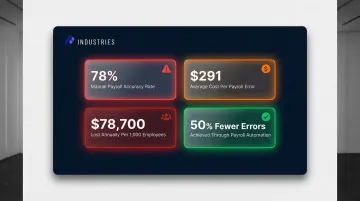
Real-world impact: Manual payroll processing achieves only 78% accuracy globally, with each error costing $291 to correct. Missing or incorrect time punches alone cost companies $78,700 per 1,000 employees annually. Automated payroll reduces errors by up to 50% and cuts processing time by roughly 25%.
Compliance and Recordkeeping
HR automation helps enterprises stay compliant by:
- Automatically distributing required policy notices
- Tracking license and certification expiration dates
- Maintaining audit-ready employee records
- Sending reminders for mandatory training completion
Manual recordkeeping failures carry severe financial risks. ICE I-9 paperwork violations result in fines ranging from $288 to $2,861 per error, with recent enterprise penalties exceeding $8 million for systemic compliance failures. Automated credential tracking—with tiered alerts at 90, 60, and 30 days—eliminates the manual calendar-watching that lets these gaps slip through.
HR Service Desks and Employee Self-Service
AI-powered HR chatbots handle common employee questions around the clock, including:
- PTO balances and leave requests
- Benefits questions and enrollment status
- Policy lookups and compliance acknowledgments
- Pay stub access and direct deposit updates
This reduces repetitive HR support tickets while freeing HR staff for higher-judgment work.
Real-world impact: 67% of employees prefer self-service HR portals and report 40% higher engagement levels when these tools are available.
Benefits of HR Automation
Efficiency and Time Savings
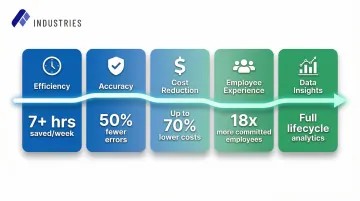
Automating administrative tasks resulted in HR staff saving over seven hours per week. At the enterprise level, a global payroll platform can save 120 hours monthly in admin work. This frees HR to focus on strategic priorities like workforce planning, talent development, and culture-building.
Reduced Errors and Improved Data Accuracy
Manual entry of payroll data, timesheets, and employee records introduces costly mistakes. Automated systems execute these tasks consistently, reducing payroll errors, compliance breaches, and data discrepancies across systems. Beyond the direct cost of fixing errors, 14% of businesses faced litigation or compliance issues related to payroll mistakes.
Cost Reduction
Automation reduces labor costs tied to manual administrative processing. Enterprise platforms that combine AI with human oversight can cut operational HR processing costs by up to 70% compared to traditional US-based staffing models — without sacrificing quality or compliance.
Better Employee Experience
Automation enables faster responses to employee requests, self-service access to information, and streamlined onboarding — all of which contribute to higher employee satisfaction. Workers who felt their onboarding was highly effective are 18 times more likely to feel highly committed to their organization.
Data-Driven Decision-Making
Automated HR systems collect and organize data across the employee lifecycle — from sourcing channels that produce top performers to onboarding bottlenecks that delay productivity. This gives HR leaders the analytics needed to optimize processes and present measurable ROI to the C-suite.
Taken together, these benefits point to a consistent pattern: less time on administrative work, fewer costly errors, and better visibility into what's actually driving performance.
Challenges of HR Automation
Implementation Costs and Integration Complexity
HR automation tools require upfront investment and must integrate with existing systems—HRIS, payroll, ATS, LMS. Siloed tools that don't communicate with each other create new data inconsistencies rather than solving them.
The ROI gap: Despite high adoption, 88% of HR leaders report not realizing significant business value from AI tools. The primary culprits are integration with legacy systems (42%) and organizational resistance to change (41%).
Choose platforms with strong integration capabilities or an orchestration layer that manages data flow across systems. Assembly Industries, for example, offers 35+ connectors across ATS, HRIS, ERP, VMS, and CRM systems—and because each implementation builds on the last, the second project typically ships 30–40% faster than the first.
Employee Resistance and Change Management
Both HR staff and employees may resist new automated workflows. HR professionals may fear role displacement, while employees may struggle with unfamiliar self-service systems.
To reduce friction during rollout:
- Communicate benefits clearly—emphasize how automation frees HR for strategic work, not job elimination
- Provide comprehensive training for both HR teams and end users
- Start with a single high-impact use case to demonstrate value before scaling
- Involve stakeholders early in the selection and design process
Data Privacy and Security Risks
HR systems hold highly sensitive employee data—payroll, health information, performance records. Automating data collection and storage increases exposure if security controls are inadequate.
The stakes are high: HR data appeared in 81.7% of data breaches, with compromised employee PII costing $181 per record. Select SOC 2-compliant platforms—like Assembly Industries—that include role-based access controls, encryption (TLS 1.2+ for data in transit, AES-256 for data at rest), and comprehensive audit logging.
How to Implement HR Automation: A Step-by-Step Approach
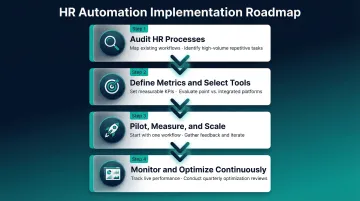
Step 1: Audit Your Current HR Processes
Before selecting any tools, map all existing HR workflows and identify which tasks are high-volume, rule-based, and error-prone. Prioritize these for automation first.
Critical principle: Automating a broken process just speeds up bad results. Fix process design before automating.
Document:
- Current process steps and handoffs
- Time spent per task
- Error rates and compliance risks
- Manual bottlenecks and pain points
Step 2: Define Success Metrics and Choose the Right Tools
Establish clear outcome metrics before evaluating tools:
- Time-to-hire reduction
- Payroll error rate
- HR ticket resolution time
- Employee satisfaction scores
- Cost per hire
- Onboarding time-to-productivity
Tool selection trade-offs:
Point solutions (single-function tools for payroll or ATS) are cheaper upfront but create integration burden and data silos.
Integrated platforms or orchestration layers (like Assembly Industries) manage multiple HR functions end-to-end with outcome accountability, which suits enterprise needs. These platforms provide the software, expert implementation teams, and ongoing management that encode your business rules, compliance requirements, and system integrations from day one.
Step 3: Run a Pilot, Measure Results, Then Scale
Start with one automated workflow—onboarding document collection or payroll processing—and measure it against defined success metrics. Gather employee feedback and iterate before rolling out across the HR function.
Pilot benefits:
- Reduces implementation risk
- Builds organizational buy-in through demonstrated results
- Identifies integration issues before full-scale deployment
- Allows refinement of workflows based on real user experience
Step 4: Maintain, Monitor, and Optimize Continuously
Once your workflows are live, sustained performance requires active oversight. Set up real-time monitoring dashboards, schedule regular audits for accuracy and compliance, and update systems as regulations or organizational needs shift.
Ongoing optimization:
- Track throughput, completion rates, and processing times
- Monitor error rates and quality scores
- Measure business impact (cost savings, productivity improvements, ROI)
- Conduct quarterly reviews to identify new automation opportunities
Frequently Asked Questions
What is HR automation?
HR automation is the use of software and AI tools to handle repetitive, rule-based HR tasks—such as payroll, onboarding, and compliance tracking—with minimal manual input. This frees HR teams to focus on strategic work like talent development and culture-building.
What HR tasks can be automated?
The most commonly automated HR tasks include payroll processing, applicant tracking, onboarding and offboarding workflows, benefits administration, time tracking, compliance documentation, and HR service desk responses via chatbot.
What is an example of HR automation?
An automated onboarding workflow triggers document e-signature requests, IT access provisioning, and benefits enrollment reminders the moment a candidate accepts an offer, without any manual HR intervention. The system completes new hire intake in minutes rather than days.
What are the benefits of automating HR processes?
Automation delivers measurable results across HR operations:
- Saves 7+ hours per week per HR employee
- Cuts payroll and compliance errors by up to 50%
- Reduces administrative costs by up to 70% with AI-powered platforms
- Improves employee self-service experience
- Enables data-driven workforce decisions through built-in analytics
What are HR automation tools?
HR automation tools range from specialized platforms (ATS for recruiting, LMS for training, payroll software like ADP) to integrated HCM suites like SAP SuccessFactors or Workday. Enterprise orchestration platforms sit above these, automating multiple HR functions end-to-end with full outcome accountability.
What are the 4 types of automation?
The four types commonly referenced are:
- Task automation — rule-based, single tasks like auto-generating offer letters
- Process automation — multi-step workflows like end-to-end onboarding
- Intelligent automation — AI/ML-powered decisions such as resume screening
- Hyperautomation — combining RPA, AI, and integration tools to automate entire business functions