Introduction
Most recruiting teams today face a productivity paradox: they've adopted an Applicant Tracking System (ATS) to manage candidates, and many are experimenting with AI screening tools to handle growing application volumes — but they're running these systems in separate browser tabs as disconnected silos. The gains only materialize when these systems are integrated — when AI scores, enriched candidate data, and screening insights surface directly inside the recruiter's native ATS workflow.
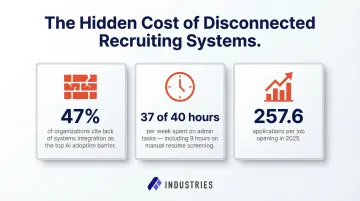
The scale of the problem is significant. Currently, 47% of organizations cite lack of systems integration as their primary barrier to adopting AI-based recruiting tools. Without seamless connectivity, recruiters waste 37 hours of a 40-hour workweek on administrative tasks, including 9 hours dedicated solely to manual resume screening. Meanwhile, average application volumes surged to 257.6 per job in 2025, making manual review mathematically unsustainable.
This guide covers:
- When integration is the right strategic move for your team
- What preparation work is required before touching a single API key
- The exact six-step process to execute integration successfully
- Technical variables that determine whether your integration runs smoothly or generates noise
- The most common mistakes that cause integrations to fail
Key Takeaways
- AI recruiting tools deliver full value only when integrated with your ATS, not running as separate platforms
- Before any API setup, audit your ATS data and map recruiter workflows end-to-end
- Use webhooks over polling for real-time candidate syncing
- Map AI explainability fields back into your ATS so every decision has a documented rationale
- Keep humans in the loop: AI surfaces and ranks candidates, but final decisions stay with your team
- Measure success with specific KPIs: time-to-screen reduction, interview-to-offer ratio, and selection rate monitoring
When Should You Integrate AI Recruiting Tools With Your ATS?
Integration isn't the right move for every team at every stage. Connecting an AI tool to a messy, poorly configured ATS will only accelerate bad decisions and compound existing data quality problems.
Signals that indicate you're ready for integration:
- Application volumes exceeding manual review capacity (200+ per role is a common threshold)
- Recruiters spending most of their time on screening rather than relationship-building or strategic work
- Clean, consistent ATS data — standardized job titles, minimal duplication, reliable candidate records
- IT or RevOps support available to manage API credentials and monitor integration health
- Defined success metrics so you can actually measure ROI after go-live
Before you integrate, address these gaps first:
- Duplicate or inconsistent candidate records that haven't been deduplicated or merged
- No technical support in place to manage API keys, webhook configurations, or troubleshooting
- Baseline KPIs not yet established — without them, evaluating ROI after integration is guesswork
- Job titles and skill taxonomies unstandardized across requisitions, with the same role described a dozen different ways
Attempting integration without these foundations typically results in poor AI accuracy, low recruiter adoption, and wasted implementation effort. Fix the foundation before building the automation layer.
What You Need Before Integrating AI Recruiting Tools With Your ATS
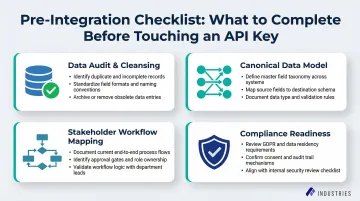
Skipping pre-integration prep is where most ATS rollouts go wrong. Complete this checklist with IT, TA operations, and a compliance stakeholder before any technical setup begins.
Data Audit and Cleansing
AI ranking models applied to messy data produce misleading scores — and because those scores appear directly on candidate profiles, recruiters often act on them without questioning the underlying data quality.
Specific cleanup tasks required:
- Merge duplicate candidate profiles using string matching and email deduplication
- Normalize job titles across requisitions (e.g., standardize "Data Scientist," "ML Specialist," and "Quantitative Analyst" to a single standard title)
- Archive stale requisition folders (closed for more than 90 days) to prevent AI from scoring against irrelevant job descriptions
- Validate that critical fields (location, experience level, required skills) are populated consistently
Poor data quality is one of the most significant risks during integration. Skipping this step guarantees inaccurate AI outputs.
Canonical Data Model Definition
Standardize the key fields the AI tool will read from and write to. Inconsistent field naming between the ATS and AI tool causes most failed data syncs.
Required field mapping:
- Candidate ID (unique identifier)
- Application Source (LinkedIn, referral, career site)
- Current Pipeline Stage (applied, screening, interview, offer)
- GDPR/CPRA Consent Flags (tracking candidate privacy preferences)
- Custom AI output fields (match score, reasoning note, skill tags, audit log ID)
Document this data model in a shared spreadsheet before any API configuration begins.
Stakeholder Workflow Mapping
Document the current recruiter workflow end-to-end — from the moment a candidate applies to when an offer is extended — specifically to identify manual bottlenecks the AI integration should target.
Key questions to answer:
- At what point should AI auto-rank candidates? (Immediately at application submission, or only after a stage change?)
- What triggers a candidate to move from "applied" to "screening"?
- Where do recruiters currently waste the most time?
- What information do recruiters need to see on a candidate profile to make a decision?
This exercise defines trigger points and ensures the integration supports actual recruiter behavior rather than forcing workflow changes.
Compliance Readiness Check
Before connecting a third-party AI tool to candidate data, verify the AI vendor holds SOC 2 Type II certification and complies with relevant data privacy regulations.
Required compliance validations:
- SOC 2 Type II certification — unlike Type I, which assesses compliance at a single point in time, Type II evaluates whether security controls function effectively over six to 12 months
- GDPR Article 22 compliance — candidates have the right not to be subject to decisions based solely on automated processing
- CPRA compliance — applicants in California now possess the same comprehensive privacy rights as consumers
- NYC Local Law 144 compliance — employers must provide 10-business-day advance notice to candidates and conduct annual bias audits
Assembly Industries, for example, maintains SOC 2 certification and builds audit logging into its automation infrastructure — illustrating the security baseline teams should expect from any automation partner handling sensitive HR data.
Success Metric Definition
Define 2-3 measurable goals before going live and document them as the baseline against which integration ROI will be evaluated.
Example success metrics:
- Reduce time-to-screen by 50% (from 3 days to 1.5 days)
- Improve interview-to-offer ratio to 5:1
- Maintain selection rate parity across demographic groups (four-fifths rule)
- Increase recruiter capacity for relationship-building by 15 hours per week
Teams that define these benchmarks upfront can identify within the first 30 days whether the integration is delivering — and course-correct before bad habits form around flawed outputs.
How to Integrate AI Recruiting Tools With Your ATS
This is a six-step process that moves from workflow design through technical setup, testing, and live monitoring. Skipping or rushing any step typically results in data sync failures, low adoption, or compliance gaps.
Step 1: Map the Desired Recruiter Workflow
Design the integration backwards from the recruiter's experience. Decide what the AI should surface (e.g., a ranked candidate list with match scores) and where it should appear (e.g., on the candidate profile card in the ATS) before configuring any technical connection.
Define exact trigger points:
- What event causes the AI to score a candidate? (Application submission? Stage change to "screening"?)
- Should AI re-score candidates when job descriptions are updated?
- Where should AI outputs be visible in the ATS interface?
This step ensures the integration supports actual recruiter behavior rather than forcing workflow changes.
Step 2: Generate and Scope API Credentials
Generate a dedicated API key in the ATS with strict role-based permissions. The AI tool should only have read access to candidate data and write access to specific custom fields, never admin access to billing, payroll, or HRIS modules.
Least-privilege access requirements:
- Read access: Candidate profiles, resumes, job descriptions, application metadata
- Write access: Custom fields only (match score, reasoning note, skill tags, audit log ID)
- No access: Billing settings, payroll data, employee records, admin configuration
Least-privilege access is a compliance requirement, not just a preference. Document which API key has which permissions and rotate credentials every 90 days.
Step 3: Configure Webhooks for Real-Time Syncing
With API credentials scoped in Step 2, the next decision is how data moves. Polling — where the AI tool periodically asks the ATS for new applicants — is slow and burns API rate limits. Webhooks push data to the AI tool the exact moment an event occurs, enabling near real-time screening.
How to configure webhooks in major ATS platforms:
- Greenhouse: Configure webhooks by specifying an endpoint URL and secret key. Greenhouse uses HMAC SHA256 digital signatures to verify authenticity. Subscribe to the
application createdevent to trigger AI scoring when candidates apply. - Lever: Configure webhooks with HMAC algorithm (SHA256 digest mode). Subscribe to
applicationCreatedandcandidateStageChangeevents to push candidate data when applications are submitted or moved to screening stages.
Webhooks are essential for any time-sensitive hiring role. If a candidate applies at 9 AM and AI scoring doesn't happen until 3 PM due to polling delays, you've lost six hours of response time on a candidate your competitors may already be screening.
Step 4: Map Custom Fields and Data Objects
Field mapping determines whether AI outputs actually reach recruiters or disappear into a system void. Create custom fields in the ATS to receive AI outputs — specifically a numeric match score (0–100), a brief score reasoning note (1–2 lines of explainability), normalized skill tags, and an audit log reference ID.
Required custom fields:
- Match Score (integer, 0–100)
- Score Reasoning (text field, 200 characters) — e.g., "Strong Python and AWS experience; 5 years in SaaS; matches 8 of 10 required skills"
- Normalized Skills (multi-select or tag field) — e.g., "Python, AWS, Kubernetes, CI/CD"
- Audit Log ID (text field) — reference ID linking to detailed AI decision log
Without these fields, AI insights float in a void and recruiters have no way to act on them inside their ATS workflow. The EEOC treats algorithmic decision-making tools as employment selection procedures subject to Title VII. Explainability is a legal requirement, not a nice-to-have.
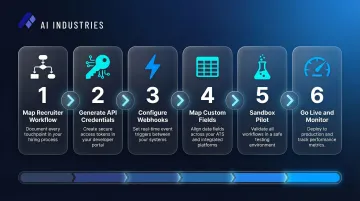
Step 5: Build Fallback Protocols and Run a Sandbox Pilot
APIs time out and webhooks occasionally fail. Build a retry/queue mechanism so candidate data is not lost during ATS maintenance windows.
Failsafe mechanisms:
- Greenhouse will make up to 7 retry attempts over 15 hours if a webhook fails
- Lever will attempt to send the webhook five times, waiting longer between each try
- Your AI tool must handle these retries gracefully to prevent duplicate candidate processing
Sandbox pilot requirements:
- Connect the AI to a non-production ATS environment
- Push 50+ test resumes with known attributes
- Verify that scores populate correctly in custom fields without overwriting recruiter notes
- Confirm the audit log captures every data push
- Test failure scenarios (API timeout, malformed resume, missing job description)
Do not skip the sandbox pilot. Errors in field mapping can silently overwrite recruiter notes or fail to populate custom fields. Both failures are invisible to the recruiter, but both will degrade hiring quality.
Step 6: Go Live and Monitor Sync Logs Daily
Push the integration to production, assign a TA ops owner to monitor API error logs daily for the first two weeks, and confirm data latency is within acceptable thresholds (a few seconds for webhook-driven flows).
Post-launch monitoring checklist:
| Action | Target Threshold |
|---|---|
| Review API error logs | Daily for first two weeks |
| Verify sync latency | Under 10 seconds |
| Gather recruiter feedback on AI-enriched fields | Week 1 and Week 2 check-ins |
| Track adoption rate | % of recruiters using AI scores in decisions |
| Monitor selection rate parity | Across demographic groups (ongoing) |
Assign a single owner for integration health monitoring. If issues arise and no one is accountable, the integration will quietly degrade.
Key Variables That Affect Integration Success
Two teams can follow the exact same steps and get very different outcomes. The variables below are the control levers that determine whether an integration runs smoothly or generates noise.
Integration Pattern Choice
Choose the pattern that fits your team's technical capacity and hiring velocity:
| Pattern | Best For | Pros | Cons |
|---|---|---|---|
| Pre-built/native connectors | Small teams, quick pilots | Fastest setup, no coding required | Least customizable, limited field mapping |
| REST API with scheduled batch sync | Medium-complexity stacks | Simple, predictable | Not real-time, can introduce hours of latency |
| Webhook-driven enrichment | High-volume or fast hiring cycles | Near real-time, event-driven | Requires more technical setup, retry logic needed |
| Middleware/iPaaS (Workato, MuleSoft) | Multiple downstream systems need enriched data | Centralized, reusable, robust governance | Higher cost, longer implementation time |
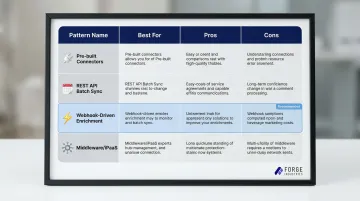
Workato excels at real-time automation and low-code recipe building, while MuleSoft is best suited for complex enterprises requiring strict governance.
Key connector questions to ask:
- Does it support write-back to custom fields?
- Does it return explainability notes?
- Does it support batch backfill for historical ATS records?
Data Field Mapping Quality
Once you've selected your connector, the next thing to get right is how fields map between systems. Poorly mapped fields — such as free-text skills versus standardized skill identifiers — cause "taxonomy drift," where "JavaScript" and "JS" are treated as different skills, producing false negatives in candidate ranking.
Unstructured ATS data and inconsistent job titles severely degrade AI matching accuracy. Map skills to a standardized ontology like the US Department of Labor's O*NET, which covers over 900 occupations. Normalized fields improve match accuracy and enable downstream reporting on skills gaps.
Explainability and Audit Trail Configuration
Regulators and candidates increasingly require transparency in AI-assisted hiring decisions. If the AI's reasoning isn't written back to the ATS as a readable note, recruiters can't explain a rejection, and compliance audits become risky.
The EEOC explicitly states that employers cannot contract away their non-discrimination obligations — vendor indemnification does not shield companies from liability for algorithmic adverse impact. Score reasoning and audit log ID fields are the documentation layer that makes the integration legally defensible — configure them from day one.
Human-in-the-Loop Workflow Design
The integration must be explicitly configured so that AI outputs are inputs to human decisions, never automated rejections. The AI should surface the top candidates with ranked scores; a recruiter must take the action to advance or reject.
GDPR Article 22 grants data subjects the right not to be subject to decisions based solely on automated processing. This is both a best practice and, in some jurisdictions, a legal requirement.
Common Mistakes When Integrating AI Recruiting Tools With Your ATS
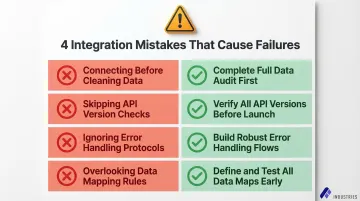
Most integration failures aren't caused by the AI tool itself — they come from how the connection is set up. These four mistakes show up repeatedly, and each one is avoidable.
Connecting before cleaning your ATS data. Duplicate profiles, inconsistent job titles, and stale records cause the AI to generate inaccurate rankings. Worse, those scores appear on candidate profiles, so recruiters trust them without recognizing the data quality problem underneath. Complete a full data audit before any API credentials are generated.
Skipping the sandbox and deploying straight to production. Field mapping errors can silently overwrite recruiter notes or leave custom fields unpopulated — problems that are invisible until a hiring decision goes wrong. Always validate with real test resumes in a sandbox environment before going live.
Using polling instead of webhooks for active roles. Batch-polling introduces hours of lag between a candidate applying and receiving an AI score, which eliminates the speed advantage the integration was meant to provide. For any role where time-to-review matters, use webhook-driven enrichment.
Mapping the score without the reasoning. A numeric match score with no context creates a black-box problem — recruiters distrust it and stop using it within weeks. Configure score reasoning as a private note or comment on the candidate profile, alongside the numeric score.
Conclusion
Integrating AI recruiting tools with your ATS transforms it from a passive candidate tracker into an active, intelligent hiring engine, but only when built on clean data, properly mapped fields, and a human-in-the-loop workflow.
Most integration failures trace back to preparation gaps, not technical complexity. Skipping the data audit, bypassing the sandbox, or neglecting explainability fields account for most failed rollouts. Implementation timelines vary drastically, ranging from 2 to 12 weeks for agile platforms like Greenhouse and Lever to 9 to 18 months for complex enterprise HCMs like Workday. Rushing this timeline guarantees post-launch instability.
For enterprise teams that want AI-driven recruiting outcomes without managing the technical configuration themselves, Assembly Industries offers a fully configured, SOC 2-compliant integration built on AI agents with human oversight. The result: a recruiting operation that runs efficiently while your team stays focused on the decisions that actually require human judgment.
Frequently Asked Questions
Frequently Asked Questions
How to incorporate AI into recruiting?
Incorporating AI into recruiting starts with identifying high-volume, repetitive tasks: resume screening, candidate ranking, and interview scheduling. From there, connect dedicated AI tools to the ATS via API or webhooks so AI insights surface directly in the recruiter's existing workflow.
How is AI used in applicant tracking systems?
AI is used within or alongside ATS platforms to automatically score and rank incoming applications, resurface past candidates who match new roles, and parse resume data into structured fields. It also provides explainable reasoning that helps recruiters make faster, more consistent decisions.
Can ATS tell if you use AI?
This question typically refers to whether an ATS can detect AI-generated resumes or cover letters. Modern ATS platforms are increasingly incorporating AI-detection signals, though these tools are still evolving in accuracy. Candidates should not rely on AI-generated content going unnoticed in automated screening systems.
Can you use AI to do a mock interview?
Yes, AI-powered mock interview tools exist and can simulate realistic interview scenarios, provide feedback on answers, and help candidates practice responses. These are separate from ATS-integrated AI tools and are typically used by candidates rather than recruiters.
How long does integrating AI recruiting tools with an ATS typically take?
A focused integration pilot typically takes four to eight weeks, covering workflow mapping, API/webhook setup, sandbox testing, and initial KPI tracking. More complex enterprise environments or additional compliance review can extend the timeline to several months.
What data should be written back to the ATS from an AI recruiting tool?
Key write-back fields include:
- Numeric match score
- Brief explainability note (score reasoning)
- Normalized skill tags and parsed experience data
- Source channel attribution
- Audit log reference ID
Store these as custom fields or comments to preserve original recruiter notes and candidate privacy.