Introduction
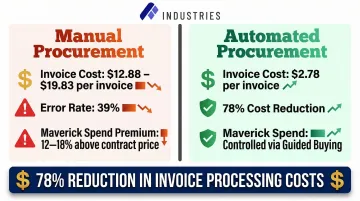
Procurement teams waste enormous time on repetitive manual tasks—chasing approvals through email chains, re-entering data across disconnected systems, and manually matching invoices against purchase orders. This operational burden creates real business consequences: cost overruns, compliance gaps, and delayed vendor payments that damage supplier relationships and erode margins. Manual invoice processing costs the average business $12.88 to $19.83 per invoice, and nearly 39% of manually processed invoices contain at least one error.
Procurement automation has moved from aspirational to essential for organizations of every size. Those still relying on paper-based workflows and spreadsheet tracking are falling further behind, particularly as workloads are projected to increase by 8% to 10% in 2026 while budgets remain flat. This guide covers what procurement automation is, the tangible benefits it delivers, which processes to target first, what tools to evaluate, and how to implement it successfully.
Key Takeaways
- Procurement automation replaces manual tasks with software-driven workflows, reducing cycle times by up to 50% and cutting errors across the procure-to-pay process
- Key benefits: 78% lower invoice processing costs, faster approvals, stronger compliance, and real-time spend visibility
- High-impact processes to automate first: purchase requisitions, invoice processing, vendor management, contract lifecycle, and spend analysis
- Successful implementations pair the right technology with clear objectives and a phased rollout — not a big-bang deployment
- A single orchestration platform consistently outperforms a patchwork of disconnected point solutions
What Is Procurement Automation?
Procurement automation uses software and technology to digitize, standardize, and execute repetitive procurement tasks automatically. It covers the full spectrum from purchase requisitions and supplier selection to invoice approval and payment, replacing manual, paper-based, or spreadsheet-driven methods with intelligent workflows.
Manual procurement runs on email chains for approvals, phone calls to chase purchase orders, Excel spreadsheets to track vendor data, and three-way matching (manually comparing invoices against POs and goods receipts) handled line by line by AP staff.
Automated procurement replaces all of this with digital workflows: approvals route based on predefined rules, purchase orders generate upon sign-off, and invoices match against POs and receipts instantly. Exceptions surface for human review; everything else moves without intervention.
Procurement automation spans multiple sub-processes:
- Source-to-Contract (S2C): Covers supplier selection, negotiation, and contract execution
- Procure-to-Pay (P2P): Handles purchase requisition through supplier payment
- Source-to-Pay (S2P): Combines S2C and P2P into a single end-to-end procurement lifecycle
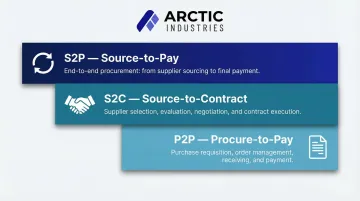
Solutions range from standalone tools that automate a single step—like invoice scanning—to comprehensive platforms that orchestrate the entire procurement lifecycle with unified data, workflows, and reporting.
Key Benefits of Procurement Automation
Efficiency and Speed
Automation eliminates bottlenecks in approval chains and manual data entry, compressing procurement cycle times dramatically. Organizations using formal procurement orchestration tools have cut their source-to-contract cycle times by 20 days, dropping from 40 days to just 20 days (and 15 days for top performers). In the procure-to-pay cycle, invoice processing times drop from an average of 14.6–17.4 days to just 3.1 days for best-in-class teams.
McKinsey estimates that digitizing the source-to-pay cycle can automate up to 60% of manual tasks, freeing procurement staff to focus on strategic supplier management rather than tactical data entry.
Cost Reduction
Automation cuts costs on two levels: fewer labor hours spent on transactional tasks, and fewer errors, missed payments, and instances of maverick spend.
The financial gap between manual and automated procurement is significant. While average organizations spend $12.88 per invoice, best-in-class AP teams using automation process invoices at just $2.78—a 78% reduction.
Maverick (off-contract) spend is another major source of value leakage. Research shows that every dollar of maverick spend costs 12% to 18% more than compliant spend, and maverick spend loses businesses more than 5% of negotiated value. Automated P2P workflows and guided buying catalogs force purchasing through approved channels, capturing these lost margins.
Compliance and Risk Management
Automated workflows enforce spending policies, approval thresholds, and regulatory requirements systematically, generating audit trails and flagging exceptions automatically rather than relying on individuals to apply rules consistently.
Manual processes create real compliance exposure. PCAOB inspection data shows material weakness findings related to IT controls increased 23% between 2020 and 2024. SOX 404 compliance requires granular documentation — every manual adjustment and authorization needs a digital paper trail.
Automated 3-way matching ensures that ordering, receiving, and approving are handled by the right roles in the right order. If anything is missing or mismatched, the invoice stops. This means:
- Policy enforcement happens at every transaction, not just during audits
- Approval thresholds are applied automatically based on spend category and amount
- Audit trails are generated continuously, covering 100% of transactions rather than sampled subsets
The result is a shift from reactive compliance sampling to proactive, continuous monitoring.
Real-Time Visibility and Spend Control
Centralized procurement data and automated reporting give finance and procurement leaders live dashboards on spending patterns, supplier performance, and budget adherence. This real-time visibility enables faster, better-informed decisions.
Procurement departments manage an average of 70.8% of enterprise spend. That remaining 29% of unmanaged spend is where cost control and strategic impact go unrealized.
When travel, expense, and accounts payable are managed as disconnected workflows, finance teams struggle to see the full picture of spend as it unfolds, causing small problems to compound. In contrast, organizations that consolidate spend data enjoy greater forecast accuracy, with most realizing a variance of less than 5%.
Stronger Supplier Relationships
Faster, more transparent procurement processes — automated PO transmission, status updates, and on-time payments — build supplier trust and reduce friction. The downstream benefits include better pricing, priority service during supply disruptions, and more collaborative problem-solving.
Slow manual processing has measurable consequences. More than half of manufacturing suppliers report experiencing late payments — a pattern that erodes trust, reduces suppliers' willingness to extend credit, and prompts them to raise prices to offset payment risk.
By accelerating invoice processing, buyers can capture early-payment discounts and provide suppliers with predictable cash flow, elevating the buyer to "customer of choice" status.
Which Procurement Processes Can Be Automated?
Purchase Requisitions and Purchase Orders
Automating PO creation and routing—with predefined approval thresholds, digital templates, and mobile approval notifications—eliminates delays and errors inherent in email-based or paper approval chains. This is typically the highest-ROI starting point for procurement automation.
Digital workflows route requisitions to the appropriate approver based on spend thresholds, department, or vendor type. Once approved, the system auto-generates a purchase order and transmits it directly to the supplier, creating an immediate audit trail and reducing cycle time from days to hours.
Invoice Processing and Three-Way Matching
Automated invoice processing uses OCR (optical character recognition), digital submission portals, and rules-based matching to automatically cross-reference invoices against POs and goods receipts. Discrepancies are flagged for human review only when needed.
Invoice exceptions are a primary bottleneck in manual AP. Top-performing automated organizations report an invoice exception rate of just 11.1%, compared to 20.9% for all others. Manual environments also face a separate risk: duplicate payments account for up to 2% of total supplier invoices processed.
Top-performing teams using automation achieve a 51.0% straight-through processing rate, eliminating human intervention for over half of their invoice volume.
Vendor Management and Supplier Onboarding
Vendor onboarding, qualification tracking, performance monitoring, and risk scoring can all be automated through supplier portals and centralized databases. This reduces onboarding time, keeps supplier data current, and gives procurement teams instant visibility into supplier health and compliance status.
Manual supplier onboarding is consistently slow, often taking weeks due to fragmented email threads and spreadsheet tracking. A global manufacturing leader improved time to onboard a new supplier from 50 days to 8 days by implementing a centralized, self-service portal. Another enterprise reduced supplier onboarding time from an average of 21 days to one day.
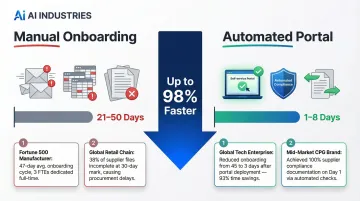
Automated portals improve compliance tracking (such as W-9s, tax forms, and ESG attestations) and enable cross-checks with regulatory and sanction databases, minimizing exposure to non-compliant vendors.
Contract Lifecycle Management
Contract management automation handles creation from templates, routes contracts for e-signature, stores executed agreements in a searchable repository, and triggers alerts for renewal dates, expiration deadlines, and compliance obligations. This prevents costly lapses and eliminates manual tracking.
Static, disconnected contracts carry a steep price. The numbers reveal the scope of the problem:
- Poor agreement management costs organizations nearly $2 trillion in annual global economic value (Deloitte)
- Organizations lose an average of 8.6% of contract value through poor post-execution management
- An average of 9.2% of annual revenue is lost due to contract mismanagement
Spend Analysis and Reporting
Automated spend analysis tools aggregate procurement data across categories, departments, and suppliers in real time, applying AI-driven classification to surface cost-saving opportunities, consolidation plays, and anomalies that manual reporting would miss entirely.
In manual environments, a massive portion of indirect purchasing falls into "tail spend"—the 80% of transactions that represent only 20% of total dollar spend. Without automated classification, this spend remains fragmented across thousands of unmanaged vendors.
AI-powered spend analysis automatically categorizes this data, highlighting savings opportunities. Tail spend savings can range from 5% to 20% of total spend in scope. By identifying duplicate vendors and consolidating contracts, organizations can reclaim millions in lost margin.
What to Look for in Procurement Automation Tools
Core Features to Evaluate
When evaluating procurement automation tools, prioritize these must-have capabilities:
- Automated approval workflows with configurable rules and mobile notifications
- E-procurement catalogs with punch-out capability to supplier sites
- Invoice management with three-way matching using OCR and rules-based validation
- Contract lifecycle management including templates, e-signature, repository, and renewal alerts
- Supplier portals for self-service onboarding and document submission
- Real-time spend dashboards with drill-down analytics by category, department, and supplier
Many point solutions only address one or two of these areas, forcing you to integrate and manage multiple disconnected tools.
Technology Stack Considerations
Understanding the underlying technologies helps you evaluate long-term capabilities:
AI and machine learning now sit at the core of modern procurement tools, enabling intelligent spend classification, anomaly detection, and predictive analytics that surface cost-saving opportunities humans would miss. Currently, 94% of procurement executives use generative AI at least weekly, and 43% of organizations are actively pursuing AI deployment—nearly double the level reported in the previous year.
RPA (Robotic Process Automation) handles the repetitive, rules-based tasks that drain team capacity: data entry, PO generation, invoice routing. These run without human intervention once configured. Cloud infrastructure rounds out the stack, providing scalability and real-time data sharing across locations. For organizations handling sensitive procurement and financial data, SOC 2-compliant, enterprise-grade hosting is a non-negotiable baseline.
Integration and Scalability
A procurement automation tool must integrate cleanly with existing ERP systems, accounting software, and supplier portals. Organizations should evaluate whether a single orchestration platform will better serve their long-term needs versus stitching together multiple point solutions, especially as procurement volume and complexity grow.
Organizations that transition from fragmented point solutions to a unified, API-first platform can see a 25% reduction in annual IT maintenance costs. Fragmented tools also create data silos that make advanced analytics and AI-driven decision-making unreliable—undermining the core value these platforms are meant to deliver.
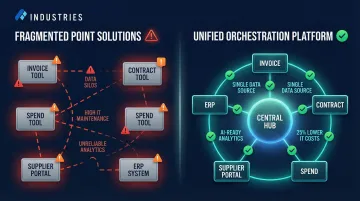
Assembly Industries addresses this directly with a unified orchestration layer that handles end-to-end procurement workflows. Their platform combines AI agents with expert implementation and human oversight, delivering 60% cost reduction while improving quality and speed.
The infrastructure is built for enterprise integration: SOC 2-compliant with 35+ connectors across ERP, HRIS, and CRM systems. That eliminates the integration burden that typically falls on IT when organizations try to stitch together point solutions.
Best Practices for Implementing Procurement Automation
Define Clear Objectives Before Selecting Any Tool
The most common implementation failure is choosing technology before understanding the problem. Organizations should interview procurement staff, finance leads, and key stakeholders to map pain points, quantify inefficiencies, and define measurable success criteria (e.g., reduce PO cycle time by 40%, cut invoice exceptions by 50%).
Without clear objectives, you risk automating the wrong processes or selecting tools that don't address your actual bottlenecks.
Map and Standardize Existing Processes First
Automation amplifies whatever process it inherits. Automating a broken process just makes the problems faster and harder to catch — so standardize first, then automate.
Before touching any tool, your team should:
- Document current workflows with each step, decision point, and approval threshold mapped
- Pinpoint where delays occur and where manual workarounds have crept in
- Standardize the process across departments so automation starts from a clean baseline
Start with High-Impact, High-Volume Processes and Expand Incrementally
Don't try to automate everything at once. Start with processes that combine high transaction volume with significant pain points—typically purchase requisitions and invoice processing. Once these are stable and delivering ROI, expand to contract management or advanced spend analytics.
This phased approach allows your team to build confidence, refine workflows, and demonstrate value before tackling more complex processes.
Invest in Change Management and Stakeholder Training
Research consistently shows that 70% of digital transformation initiatives fail to meet their objectives, with employee resistance and poor adoption among the top failure modes. KPMG notes that success will only come if humans can see automation as their partner, not as a competitor.
Procurement teams need to understand the "why" behind automation, see it as a tool that elevates their role rather than replaces it, and receive practical training on the new workflows. Communicate early, involve stakeholders in design decisions, and celebrate quick wins.
Track KPIs and Optimize Continuously
Establish dashboards that make key procurement automation KPIs visible to leadership on an ongoing basis:
- PO cycle time from requisition submission to transmission (target: days, not weeks)
- Invoice processing speed from receipt to payment approval
- Share of total spend flowing through approved channels
- Supplier on-time delivery as a signal of upstream process health
- Requisition adoption rate showing how consistently staff use the automated system
- Invoice exception rate tracking how often manual intervention is still required
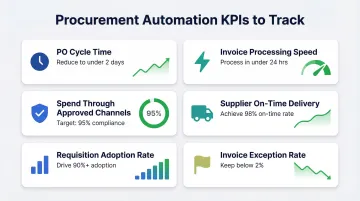
Monitor these metrics weekly or monthly and refine workflows as the business grows. When exception rates climb or adoption stalls, that's your signal to revisit the underlying workflow — not the technology.
Frequently Asked Questions
What is procurement automation?
Procurement automation uses software and technology to digitize and streamline procurement tasks—from purchase requisitions and approvals to invoice processing and supplier management—reducing manual effort, errors, and cycle times across the procure-to-pay process.
Can procurement be automated?
Yes, a large portion of procurement—particularly repetitive, rules-based tasks like PO creation, invoice matching, approval routing, and spend reporting—can be automated. Strategic activities like complex supplier negotiations still benefit from human judgment.
What is S2C vs S2P vs P2P?
Source-to-Contract (S2C) covers supplier selection through contract execution. Procure-to-Pay (P2P) covers purchase requisition through supplier payment. Source-to-Pay (S2P) is the broadest scope, encompassing both S2C and P2P as an end-to-end procurement lifecycle.
What features are important in procurement automation software?
The right features depend on your biggest pain points. Core capabilities to evaluate include:
- Automated approval workflows and e-procurement catalogs
- Invoice processing with three-way matching
- Contract lifecycle management and supplier portals
- Spend analytics dashboards and ERP integration
What is an example of an automated procurement workflow?
A typical automated workflow looks like this:
- A team member submits a digital purchase requisition
- The system routes it to the right approver based on predefined rules
- A PO is auto-generated and sent to the supplier upon approval
- The incoming invoice is automatically matched to the PO and goods receipt, then forwarded to accounts payable
Is procurement replaced by AI?
AI augments procurement rather than replacing it—automating repetitive and data-heavy tasks like spend classification, invoice matching, and risk scoring—while human expertise remains essential for supplier negotiations, strategic sourcing decisions, exception handling, and relationship management.